This is the latest news from Google Webmaster Tools, and is great news for all webmasters. Now, you can check which sites point to non-existent pages on your site directly from Google Webmaster Tools.
When somebody tries to access a non-existent link on your site, they may get a 404-error page on your site. Most of the time, the reason behind this is a site linking to one of your articles made a mistake in the URL. As your popularity increases, the number of incoming links increase. Also, do increase sites that give you broken links. Webmasters make errors in the URLs every now and then.
In order to fix this, you may just log into Google Webmaster Tools now. Go to Diagnostics->Web Crawl. Here you will see errors on the link structure. It shows URLs that are ‘Not found’. Just click it and you will see this:
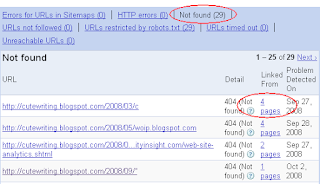
See the marked regions. It means 4 external pages link to non-existent URL on my site. Just click it and you can see which sites link.

Just go ahead, contact the webmasters doing this, and request them to change the URL to the correct one.
Advantages
1. You can now know which sites give you wrong links. This can virtually give you some free links, when they point to the right URL.
2. The sites linking to your site will have a better user experience. Nobody wants to click on a link and be directed to a non-existent page. A win-win situation.
3. Your search engine ranking will have a great effect. If you have 1000 incoming links, there may be fifty broken links. If you fix them, your search ranking may go ten positions up.
Link Resources:
Webmaster Central blog announcement
Copyright © Lenin Nair 2008
When somebody tries to access a non-existent link on your site, they may get a 404-error page on your site. Most of the time, the reason behind this is a site linking to one of your articles made a mistake in the URL. As your popularity increases, the number of incoming links increase. Also, do increase sites that give you broken links. Webmasters make errors in the URLs every now and then.
In order to fix this, you may just log into Google Webmaster Tools now. Go to Diagnostics->Web Crawl. Here you will see errors on the link structure. It shows URLs that are ‘Not found’. Just click it and you will see this:

See the marked regions. It means 4 external pages link to non-existent URL on my site. Just click it and you can see which sites link.

Just go ahead, contact the webmasters doing this, and request them to change the URL to the correct one.
Advantages
1. You can now know which sites give you wrong links. This can virtually give you some free links, when they point to the right URL.
2. The sites linking to your site will have a better user experience. Nobody wants to click on a link and be directed to a non-existent page. A win-win situation.
3. Your search engine ranking will have a great effect. If you have 1000 incoming links, there may be fifty broken links. If you fix them, your search ranking may go ten positions up.
Link Resources:
Webmaster Central blog announcement
Copyright © Lenin Nair 2008
Webmaster tools provides you with a free and easy way to make your site more Google-friendly. They can show you Google’s view of your site, help you diagnose problems, and let you share info with us to help improve your site’s visibility.
ReplyDelete----------------
Adam
Internet marketing