In the normal Blogger feed widget on the sidebar, you know that when you put in the feed URL, it fetches only the latest five articles. In this short post, we will see a workaround to enable more entries (10 or 20) in this feed using FeedBurner.
If your feed is not burnt with FeedBurner (FB), go ahead and do it. Make sure your original feed URL doesn't have any restriction on the number of posts, because, if it restricts posts to 5 (as in my feed; see why I did so), this tweak will not work. For instance, the normal feed URL of Blogger feed is like this:
"http://in-store.blogspot.com/feeds/posts/default". In its place, if you put this URL, "http://in-store.blogspot.com/feeds/posts/default?max-results=5" it will not show more than 5 posts.
Here are the steps to enable this tweak
Step 1: FeedBurner Dashboard
Go to FeedBurner dashboard for your feed and choose Buzz Boost from the Publicize tab. This feature enables displaying your feed as a HTML file anywhere through a JavaScript widget.
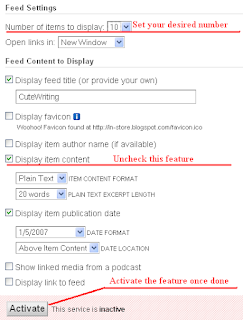
Under this feature, you will find the number of posts to display. Set it to your desired number (10 or 20 or all). Now, uncheck the option, Display Item Content. If you don't uncheck it, with the feed titles, the content will also be displayed (depending on whether you have short feed or full feed). If you don't need publication date and/or author name, etc., set them as you prefer, and Activate the feature.
Click the screenshot to know more
Step 2: Embed the JavaScript Code
Once activated, FB will display a JavaScript code. This is the JavaScript code to display the recent posts widget, set up as you specified in the last step. You can either copy-paste this code to whichever website you have, or directly embed it to Blogger as a Page Element.
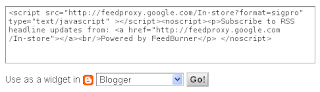
This will enable the recent entries widget with links for subscription.
Conclusion
The latest posts widgets can be enabled to show all latest entries in the blog or the entries from specific topics. For the second option, please read the last post on enabling feed for specific topics.
Copyright © Lenin Nair 2008
If your feed is not burnt with FeedBurner (FB), go ahead and do it. Make sure your original feed URL doesn't have any restriction on the number of posts, because, if it restricts posts to 5 (as in my feed; see why I did so), this tweak will not work. For instance, the normal feed URL of Blogger feed is like this:
"http://in-store.blogspot.com/feeds/posts/default". In its place, if you put this URL, "http://in-store.blogspot.com/feeds/posts/default?max-results=5" it will not show more than 5 posts.
Here are the steps to enable this tweak
Step 1: FeedBurner Dashboard
Go to FeedBurner dashboard for your feed and choose Buzz Boost from the Publicize tab. This feature enables displaying your feed as a HTML file anywhere through a JavaScript widget.
Under this feature, you will find the number of posts to display. Set it to your desired number (10 or 20 or all). Now, uncheck the option, Display Item Content. If you don't uncheck it, with the feed titles, the content will also be displayed (depending on whether you have short feed or full feed). If you don't need publication date and/or author name, etc., set them as you prefer, and Activate the feature.
Click the screenshot to know more

Step 2: Embed the JavaScript Code
Once activated, FB will display a JavaScript code. This is the JavaScript code to display the recent posts widget, set up as you specified in the last step. You can either copy-paste this code to whichever website you have, or directly embed it to Blogger as a Page Element.

This will enable the recent entries widget with links for subscription.
Conclusion
The latest posts widgets can be enabled to show all latest entries in the blog or the entries from specific topics. For the second option, please read the last post on enabling feed for specific topics.
Copyright © Lenin Nair 2008
Shea, naturally it will take space for ten or fifteen links as you enabled in the tweak. Not more than that!
ReplyDeleteNice article, I was just logging into my feedburner earlier today to get this up and running. It is funny because I found this article because I was added as a follow on Twitter and found you guys, I booked marked you too and you have some nice articles, I'll be back.
ReplyDeleteDave
KidsLoveStuff - http://www.kidslovestuff.com
Thanks Dave for the comment. Good to know CW could help you out.
ReplyDeleteYes, Denis. It would have been better that way. Thanks for the comment.
ReplyDeleteIs there any way to do it without feed burner?
ReplyDelete