If you have a publication like mine, you may be addressing a number of topics/categories. And some of your readers may be interested in only one of these topics. They may wish that they got only posts on 'creative writing' or 'blogging tips'. In professional publications like news sites and blogs like the Huffington Post, you have the option to subscribe to posts related to specific topics. Here, we will show you how you can enable this on your Blogger blog, with label syndication.
Make sure that your blog has enabled feed syndication and supports labels (which we call categories/topics).
For feed syndication settings, go to Site Feed under your blog's settings; labels are enabled whenever you put in keywords at the label text field while publishing new posts. The tweak involves syndicating content published under specific labels.
The following is the feed for a specific label:
http://blog_name.blogspot.com/feeds/posts/default/-/label_name
In this URL, replace both blog_name and label_name with the appropriate values to get your topic feed. The hyphen is not a mistake.
Remember the label_name is case-sensitive, so 'Creative Writing' is not the same as 'creative writing'. If your label name involves space as in 'creative writing', replace all of them with %20, which is the space escape character.
For instance, the feed for my topic, 'creative writing' in CW will be: http://cutewriting.blogspot.com/feeds/posts/default/-/Creative%20Writing
Grammar and Style: http://cutewriting.blogspot.com/feeds/posts/default/-/grammar%20and%20style
If you want advanced feed features, go ahead and burn this feed using FeedBurner. All the features you may be getting for your normal FeedBurner feed will be available to this feed as well.
Click the screenshot to enlarge:

Adding Feeds to Your Blog
You can now add the feeds to the blog's home page as well. Enabling this will show a list of latest entries from your main topics to your users. Also, enable the option for them to subscribe to these feeds.
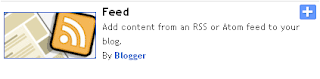
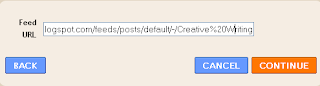
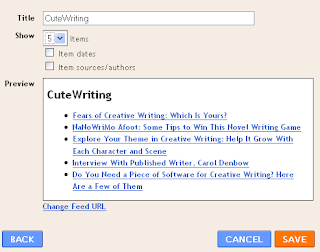
From your layout window, go to Add Page Element and choose 'Feed' as the element. Now just input your feed URL and choose number of posts to show. Look at the screenshots. Make sure you also place a subscription icon for the specific topic feed.
Choose feed as the gadget type
Choose the feed URL
Now the feed will be fetched and the last five posts will be displayed. If you need more than five articles (say, 10), then please check out this post on enabling more than 5 post titles on recent posts widget.
Conclusion
Syndicating topic-specific feeds has only advantages. Users can subscribe either your main feed with all posts or individual feeds if they wish to follow only specific posts. This way, you can grow readership for specific topics on your blog. Also, it will be easy for you to branch out to other topics without distracting current users. Of course, when you post an article relevant to both blogging and SEO, your readers for either these topics will be able to track it; just specify both labels when publishing the post.
Voice your comments and doubts, and subscribe to my blog for more such tutorials.
Copyright © Lenin Nair 2008
Make sure that your blog has enabled feed syndication and supports labels (which we call categories/topics).
For feed syndication settings, go to Site Feed under your blog's settings; labels are enabled whenever you put in keywords at the label text field while publishing new posts. The tweak involves syndicating content published under specific labels.
The following is the feed for a specific label:
http://blog_name.blogspot.com/feeds/posts/default/-/label_name
In this URL, replace both blog_name and label_name with the appropriate values to get your topic feed. The hyphen is not a mistake.
Remember the label_name is case-sensitive, so 'Creative Writing' is not the same as 'creative writing'. If your label name involves space as in 'creative writing', replace all of them with %20, which is the space escape character.
For instance, the feed for my topic, 'creative writing' in CW will be: http://cutewriting.blogspot.com/feeds/posts/default/-/Creative%20Writing
Grammar and Style: http://cutewriting.blogspot.com/feeds/posts/default/-/grammar%20and%20style
If you want advanced feed features, go ahead and burn this feed using FeedBurner. All the features you may be getting for your normal FeedBurner feed will be available to this feed as well.
Click the screenshot to enlarge:

Adding Feeds to Your Blog
You can now add the feeds to the blog's home page as well. Enabling this will show a list of latest entries from your main topics to your users. Also, enable the option for them to subscribe to these feeds.
From your layout window, go to Add Page Element and choose 'Feed' as the element. Now just input your feed URL and choose number of posts to show. Look at the screenshots. Make sure you also place a subscription icon for the specific topic feed.
Choose feed as the gadget type

Choose the feed URL

Now the feed will be fetched and the last five posts will be displayed. If you need more than five articles (say, 10), then please check out this post on enabling more than 5 post titles on recent posts widget.

Conclusion
Syndicating topic-specific feeds has only advantages. Users can subscribe either your main feed with all posts or individual feeds if they wish to follow only specific posts. This way, you can grow readership for specific topics on your blog. Also, it will be easy for you to branch out to other topics without distracting current users. Of course, when you post an article relevant to both blogging and SEO, your readers for either these topics will be able to track it; just specify both labels when publishing the post.
Voice your comments and doubts, and subscribe to my blog for more such tutorials.
Copyright © Lenin Nair 2008
Comments
Post a Comment
Comments are moderated very strictly